
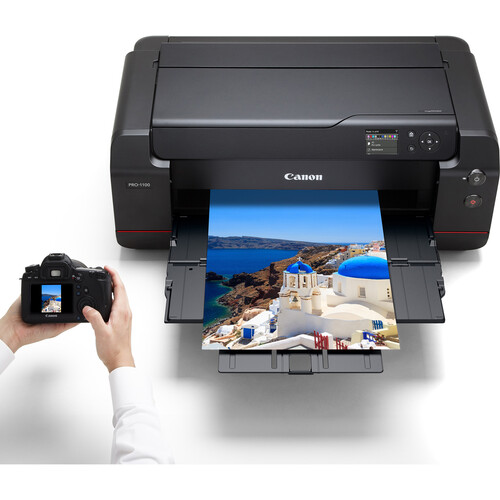
The Canon imagePROGRAF PRO-1100 is the latest addition to Canon’s esteemed line of professional large format printers. Built specifically for photographers and fine art creators, this 17-inch inkjet printer is designed to deliver unparalleled print quality. Featuring an 11-color LUCIA PRO II pigment ink system, the PRO-1100 ensures vibrant, long-lasting images that capture every detail and nuance of a creator’s work.
Canon’s vision for the PRO-1100 is simple: to help artists and photographers preserve the beauty of their work for the future. With improved ink formulation for greater black density and color accuracy, the PRO-1100 sets a new standard in photo and art printing. This model retains the familiar, iconic red line—a hallmark of Canon’s professional-grade equipment—ensuring that it lives up to the high expectations of the imaging community.
Key Features of the Canon imagePROGRAF PRO-1100
LUCIA PRO II Pigment Ink System
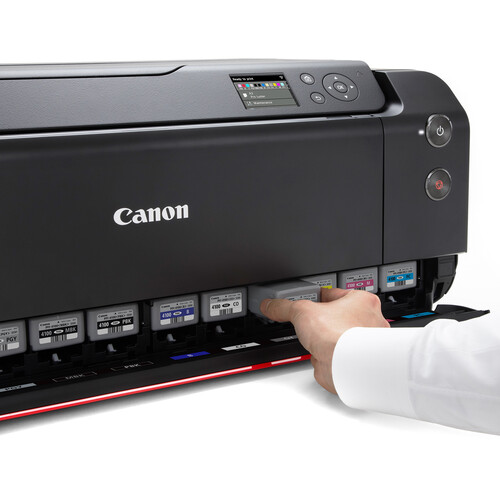
The PRO-1100 is powered by the newly developed LUCIA PRO II pigment ink system. This advanced system uses 11 color inks plus a Chroma Optimizer to deliver an extensive color gamut, improved color consistency, and enhanced gloss uniformity. This makes it ideal for photographers who need to print detailed images that maintain consistency across different media types.
Chroma Optimizer for Enhanced Gloss and Bronzing Control
The Chroma Optimizer is a unique feature that helps manage glossiness and reduces bronzing—a common issue when printing on glossy paper. By applying a uniform coat of clear ink, the Chroma Optimizer ensures that colors reflect light consistently, leading to vibrant, glossy prints that look professional and polished.
11-Color Pigment-Based Ink System
The 11-color ink system of the PRO-1100 expands the range of colors that can be reproduced compared to standard printers. It includes a newly formulated matte-black ink that allows for deeper blacks, and improved representation of blue-dark areas, enhancing the overall quality of printed photographs and artwork.
Wide-Format Borderless Printing up to 17″ x 22″
The Canon PRO-1100 supports borderless printing up to a size of 17″ x 22″. This capability is perfect for large format photographs, art prints, and presentations, allowing creators to produce professional-looking results without the need for trimming or special settings.
Improved Ink and Image Quality
Greater Black Density for Deeper Tones
One of the standout improvements of the Canon imagePROGRAF PRO-1100 is its enhanced black density. Thanks to the newly developed matte-black ink formula, the printer is capable of delivering deeper, richer black tones that significantly enhance the contrast and depth of printed images. This is especially crucial for professional photographers who demand exceptional detail and tonal range in their work.
Enhanced Blue-Dark Area Representation
The PRO-1100 also improves upon the previous generation by enhancing the reproduction of blue-dark areas. This improvement brings out greater detail and richness in scenes involving deep skies, oceans, and other dark blue elements, ensuring prints that are visually captivating and true to life.
High Light and Scratch Resistance for Long-Term Durability
Canon has designed the LUCIA PRO II inks with both light resistance and scratch resistance in mind. This allows prints to maintain their vibrant colors for longer periods, making them suitable for exhibitions and archival purposes. The glossy/semi-glossy prints are also more resistant to scratches, reducing the risk of damage during handling, framing, or transportation.
Advanced Technologies for Precision and Efficiency
L-COA PRO Image Processing Engine
The Canon imagePROGRAF PRO-1100 is equipped with the L-COA PRO Image Processing Engine, which plays a critical role in ensuring efficient and fast printing. This powerful processing engine enables the printer to manage large volumes of image data smoothly, which is particularly important when producing high-resolution prints. The combination of sophisticated algorithms and high-speed processing ensures that print jobs are completed quickly without compromising on quality.
Canon’s Air Feed System for Accurate Ink Placement
The Air Feed System is a unique feature of the PRO-1100 that helps prevent paper deflection by maintaining a steady flow of air across the media surface. This ensures that the paper remains flat during the printing process, which is vital for precise ink placement and consistent print quality. The result is a reduced risk of skewing and superior image clarity, even when printing on thicker media.
Anti-Clogging Technology and Compensation Function
Printer maintenance and reliability are crucial for professional workflows, and Canon has equipped the PRO-1100 with advanced Anti-Clogging Technology. Sensors within the print head monitor ink nozzle conditions and can automatically switch to a backup nozzle if a blockage is detected. This ensures consistent image quality, reduces the risk of banding, and minimizes the need for manual cleaning, saving time and resources for professionals.
Seamless Integration for Professional Workflows
EOS & imagePROGRAF PRO Series Technological Integration
Canon has taken great care to integrate the technological strengths of both the EOS camera series and the imagePROGRAF PRO printer series in the PRO-1100. This integration allows photographers to accurately reproduce the colors they capture, thanks to sophisticated color management and compatibility with Canon’s imaging systems. The printer works seamlessly with Canon’s Digital Photo Professional software to ensure that photographers get results that reflect their creative vision.
Professional Print & Layout Software
The Canon imagePROGRAF PRO-1100 comes with Professional Print & Layout software, providing an intuitive solution for managing print jobs. This software can be used as a standalone application or as a plug-in for Adobe software, such as Photoshop and Lightroom, allowing for a streamlined workflow. The tool is designed with photographers in mind, offering features such as soft proofing, color calibration, and the ability to create custom layouts, making it easier to produce gallery-ready prints.
Printer Management Solutions for Media and Color Calibration
The PRO-1100 includes powerful management tools like Media Configuration, Color Calibration, and Accounting Manager. These tools help users achieve precise print quality and monitor the usage of materials. The Media Configuration tool allows users to specify the type of paper they are printing on to ensure optimal print settings, while the Color Calibration tool helps maintain consistent color output. Accounting Manager can track ink and media usage for each job, providing valuable data for managing printing costs effectively.
Sustainability and Environmental Credentials
EPEAT Gold Designation for Environmental Standards
Canon has emphasized sustainability in the design of the imagePROGRAF PRO-1100. The printer has earned an EPEAT Gold designation, signifying that it meets rigorous standards for reducing environmental impact. EPEAT (Electronic Product Environmental Assessment Tool) is a globally recognized standard for assessing the environmental attributes of electronic products, and Canon’s commitment to sustainability is reflected in the PRO-1100’s compliance with its highest criteria.
Polystyrene-Free Packaging Commitment
Canon has also taken significant steps to reduce the environmental footprint of the PRO-1100’s packaging by eliminating the use of polystyrene foam. Instead, the company has opted for recyclable packaging materials that are not only environmentally friendly but also provide sufficient protection for the product during shipping. This move aligns with Canon’s broader mission to minimize waste and encourage responsible consumption across all stages of a product’s life cycle.

What Comes in the Box?
The Canon imagePROGRAF PRO-1100 comes with everything you need to start printing professional-quality photos right away. Here’s what you can expect to find in the box:
- Canon imagePROGRAF PRO-1100 17″ Professional Wireless Inkjet Photo Printer
- Printer Setup Sheet, Manual, Warranty Card, and Other Documentation – All essential paperwork is included to ensure you have the necessary information for setup and support.
- 8.5” x 11” Photo Paper Pro Luster (5 Sheets LU-101) – A sample of Canon’s premium photo paper to help you get started right away.
- Set of 12 Ink Tanks (PGI-4100) – Includes Matte Black, Photo Black, Cyan, Magenta, Yellow, Photo Cyan, Photo Magenta, Gray, Photo Gray, Red, Blue, and Chroma Optimizer, providing a full range of colors to achieve the best print quality.
- Print Head – Specifically designed to work with the LUCIA PRO II ink system for exceptional color accuracy.
- Power Cord – Everything needed to connect and power your new printer.
With this comprehensive setup, users can begin producing high-quality prints with minimal delay, ensuring a quick start to achieving gallery-quality results.
Pricing and Availability
The Canon imagePROGRAF PRO-1100 hit the market in September 2024, with a Manufacturer’s Suggested Retail Price (MSRP) of $1,299.99. This price positions the PRO-1100 as an attractive option for professional photographers, artists, and creative studios that require a reliable, high-quality large format printer at a reasonable cost.
With its advanced features and enhanced ink technology, the PRO-1100 offers excellent value for professionals looking to invest in a high-quality printer that supports a wide range of media.
The availability of the PRO-1100 provides photographers and artists with the opportunity to produce prints that match their creative vision while benefiting from Canon’s latest innovations in printing technology.
Canon imagePROGRAF PRO-1100 vs. PRO-1000: Key Comparisons
Ink System Upgrades and Technological Improvements
The imagePROGRAF PRO-1100 builds on the success of the PRO-1000, primarily by incorporating the new LUCIA PRO II pigment ink system. The improved ink formulation offers greater light resistance and better scratch resistance, which enhances both the print longevity and durability of images. Additionally, the PRO-1100’s improved matte black ink formulation delivers deeper blacks compared to the PRO-1000, which is a significant upgrade for those focused on achieving rich tonal contrasts.
Image Quality and Output Enhancements
In terms of image quality, the PRO-1100 features enhancements that make a noticeable difference, especially in dark blue and black areas. The increased density in blacks and enhanced color reproduction of blue-dark tones means that prints are more vivid, with greater depth and definition compared to those from the PRO-1000. The new Chroma Optimizer also plays a role in providing consistent glossiness, which helps reduce issues like bronzing and improves overall print quality on glossy media.
Connectivity and Workflow Improvements
The PRO-1100 also introduces more versatile connectivity options, including Wi-Fi 5 (802.11ac) for faster and more stable wireless connections, whereas the PRO-1000 only offered wired Ethernet and USB options. This makes the PRO-1100 more convenient for those who prefer a wireless setup in their studio. The new model retains support for key wireless printing features, such as Canon PRINT, Apple AirPrint, and Mopria, which adds flexibility and convenience to professional workflows.
Connectivity Options and User Interface
USB, Ethernet, and Wi-Fi Connectivity
The Canon imagePROGRAF PRO-1100 offers multiple connectivity options, ensuring seamless integration into various environments, whether at home, in a studio, or within an office setting. It supports USB 2.0, Ethernet, and Wi-Fi 5 (802.11ac), giving users the flexibility to choose the connection type that best suits their setup. The addition of Wi-Fi support makes the PRO-1100 incredibly versatile, allowing for remote printing without the need for cumbersome cables.
Canon PRINT App, Apple AirPrint, and Mopria Support
To enhance user convenience, the PRO-1100 supports wireless printing through popular applications such as Canon PRINT, Apple AirPrint, and Mopria. This means that users can send print jobs directly from their smartphones or tablets, which is particularly useful for photographers on the go who need to print high-quality images without transferring files between devices.
3.0″ Color LCD for Easy Control
The PRO-1100 features a 3.0″ color LCD screen that makes it easy to manage settings, check ink levels, and perform maintenance tasks. The intuitive interface ensures that even those who are new to professional-grade printing can easily navigate and operate the printer without any hassle. The color LCD display also offers clear status updates, which helps minimize downtime and keeps printing projects on track.
Ideal Use Cases for the Canon imagePROGRAF PRO-1100
Perfect for Photographers, Artists, and Graphic Designers
The Canon imagePROGRAF PRO-1100 is specifically designed for professional photographers, artists, and graphic designers who need reliable, high-quality printing solutions. With its wide color gamut and precise ink placement, this printer excels at producing detailed, vibrant prints that reflect the depth and accuracy of the original image. The 17″ print size is ideal for creating gallery-quality artwork, fine art reproductions, and large photographic prints that demand attention.
Suitable for Studio and Home Environments
Despite its professional capabilities, the PRO-1100 is compact enough to fit in home studios and small creative spaces. This makes it a convenient choice for freelance photographers, artists working from home, and small studios that need professional-quality printing without a large equipment footprint. The wireless printing options add even more convenience, allowing it to be seamlessly integrated into a variety of creative workspaces.
Performance and Speed
Print Speed: Bordered 17″ x 22″ Prints in Four Minutes
The Canon imagePROGRAF PRO-1100 stands out for its efficient printing capabilities, with the ability to produce bordered 17″ x 22″ prints in just four minutes. This level of performance is crucial for professionals who need to produce high-quality work on tight deadlines. The combination of the L-COA PRO Image Processing Engine and the enhanced ink system means that users can achieve rapid output without sacrificing the quality that Canon printers are known for.
Efficient Large Volume Processing with L-COA PRO
The L-COA PRO Image Processing Engine is designed to handle large volumes of image data quickly and efficiently. This is particularly beneficial for photographers and artists who often work with high-resolution files that require significant processing power. With the PRO-1100, users can be confident that their prints will be processed and printed accurately and without unnecessary delays, even during high-volume print runs.
Enhanced Print Longevity and Handling
Improved Scratch Resistance for Easier Framing and Packaging
The Canon imagePROGRAF PRO-1100 uses a specially formulated ink that includes highly crystalline wax. This formulation significantly reduces abrasiveness, making the prints less susceptible to scratches during handling. This is a critical feature for professional photographers and artists, especially when preparing prints for framing, packaging, or transportation. The scratch-resistant surface ensures that artwork remains pristine, reducing the need for costly reprints due to accidental damage.
High Image Robustness for Long-Term Display and Preservation
The enhanced light resistance of the LUCIA PRO II inks makes the PRO-1100 an ideal choice for printing works intended for long-term display. The ink’s robustness allows prints to retain their vibrant colors over time, even when exposed to light, ensuring that photographs and art prints maintain their visual impact for years to come. This durability is especially beneficial for those creating limited edition prints or pieces for gallery exhibitions where longevity is essential.
User Experience and Software Integration
Compatibility with Adobe Software and Digital Photo Professional
Canon has ensured that the PRO-1100 integrates seamlessly with popular software used by photographers and artists. The printer works smoothly with Adobe Photoshop and Lightroom, as well as Canon’s Digital Photo Professional. This compatibility allows for direct printing from these applications, providing photographers with an efficient workflow where they can go from editing to printing without the need for cumbersome file exports or adjustments.
Printer Management Tools for a Streamlined Workflow
The PRO-1100 also comes with several printer management tools designed to simplify the printing process. Tools like Media Configuration, Color Calibration, and Accounting Manager allow for a high level of customization and control. Media Configuration helps users optimize the print settings for different paper types, while Color Calibration ensures consistent output by adjusting for any shifts in color over time. Accounting Manager helps photographers keep track of ink and paper usage, making it easier to manage printing costs effectively.
Real-World Testimonials and Reviews
Early Impressions from Professionals
Early feedback from photographers and artists who have used the Canon imagePROGRAF PRO-1100 has been overwhelmingly positive. Many users have praised the printer for its exceptional image quality, noting the depth of color and precision in detail. The enhanced black density and rich blue representation have been highlighted as key improvements that allow for the production of more dynamic and visually impactful prints, particularly in challenging scenes like night photography or ocean landscapes.
Feedback on Print Quality and Features
Reviewers have also appreciated the PRO-1100’s build quality and the reliability of its ink system. The Anti-Clogging Technology has received particular praise, as it minimizes downtime and helps maintain consistent output quality. Users have noted that the integration with Canon’s software tools makes the entire printing process—from image preparation to final print output—both smooth and intuitive, which is crucial for professionals who are working on tight deadlines and require dependable performance.
Conclusion: Elevating Your Art with Canon imagePROGRAF PRO-1100
The Canon imagePROGRAF PRO-1100 Professional 17″ Wireless Inkjet Photo Printer is a powerful tool for photographers, artists, and graphic designers who demand the highest quality for their prints. With its new LUCIA PRO II pigment ink system, enhanced Chroma Optimizer, and extensive connectivity options, the PRO-1100 offers a blend of innovative technology and user-friendly features that help bring artistic visions to life.
From superior image quality and greater scratch resistance to thoughtful environmental considerations, the PRO-1100 embodies Canon’s commitment to pushing the boundaries of print technology. Whether you are looking to create gallery-ready prints, fine art reproductions, or vibrant large format photographs, the Canon imagePROGRAF PRO-1100 is designed to meet your professional printing needs, ensuring that each print captures the essence and beauty of your work.
FAQs
1. What are the key differences between the PRO-1100 and the PRO-1000?
The Canon imagePROGRAF PRO-1100 features the new LUCIA PRO II pigment ink system, which offers improved black density, better scratch resistance, and enhanced color reproduction compared to the PRO-1000. Additionally, the PRO-1100 offers more versatile connectivity options, including Wi-Fi 5, making it more convenient for wireless printing.
2. Does the Canon imagePROGRAF PRO-1100 support wireless printing?
Yes, the PRO-1100 supports wireless printing through Wi-Fi 5 (802.11ac). It is compatible with Canon PRINT, Apple AirPrint, and Mopria, allowing users to print directly from their mobile devices without needing a wired connection.
3. How does the LUCIA PRO II ink system improve print quality?
The LUCIA PRO II pigment ink system uses 11 colors plus a Chroma Optimizer to achieve a wide color gamut, deep blacks, and enhanced detail, particularly in dark blue areas. The ink’s improved light resistance and scratch resistance ensure long-lasting prints suitable for professional use.
4. Is the PRO-1100 suitable for printing on different media types?
Yes, the Canon imagePROGRAF PRO-1100 supports a wide range of media, from glossy and semi-glossy photo papers to fine art media and even thicker specialty papers. The Air Feed System helps maintain accurate ink placement regardless of media type, ensuring optimal print quality for all supported surfaces.
5. What kind of maintenance does the Canon PRO-1100 require?
The PRO-1100 is designed with Anti-Clogging Technology to reduce maintenance needs. Sensors monitor ink nozzles to prevent clogging, automatically switching to backup nozzles if needed. This feature reduces the need for manual head cleaning and helps maintain consistent print quality over time.
 IT Supplies Blog